Video

TITAN Watch – Questionnaire Gap Analysis Agent

TITAN Watch – Questionnaire Gap Analysis Agent
See how TITAN AI's Questionnaire Gap Analysis Agent flags compliance gaps between vendor questionnaire responses and real security data.

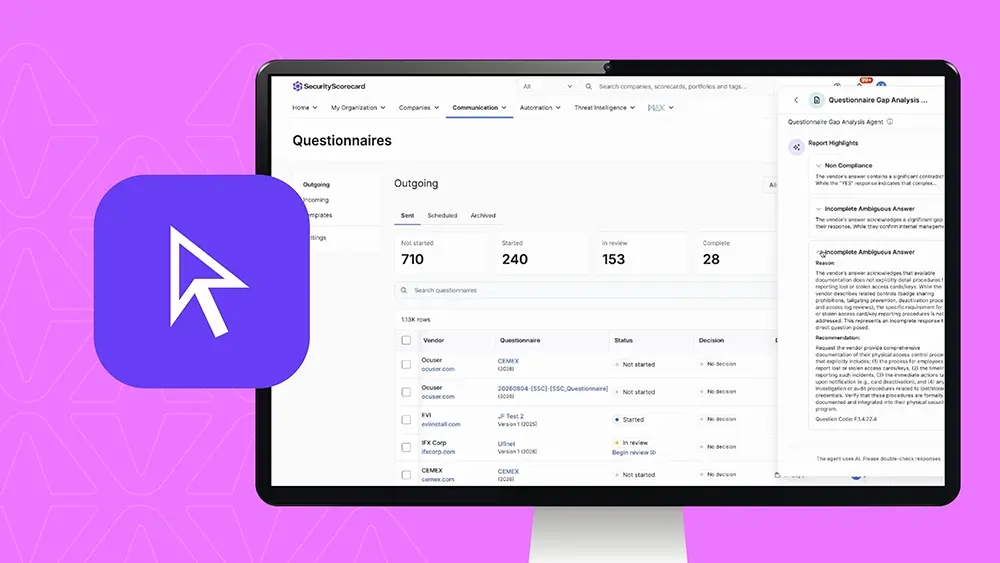
Hello. In this video, we are going to be going over our questionnaire gap analysis agent. This agent, like the rest of all of the security scorecard agents, are embedded in our platform located via the sparkle button in the bottom right hand corner. Specifically, the questionnaire gap analysis agent can help identify security gaps between self reported and actual data. What the agent will ultimately do is help you analyze the responses from a vendor’s questionnaire against the security scorecard data and documentation attached. The agent will clearly and easily articulate and identify any gaps noticed or flag everything where it seems to be satisfactory. You simply just search the questionnaire by choice or scroll through the list of all active questionnaires in your review column slated for your team’s approval. You simply point the agent at the questionnaire and it will initiate the analysis, fetch the data, and review the process. Note, it can take up to fifteen minutes, but in most cases, it is much, much shorter. Once the analysis is complete, you will be greeted with report highlights of non compliance, incomplete or ambiguous answers, or any other risks or issues that have been surfaced by the agent. You have the ability to download it in a full Excel file for easy archive or sharing. You also can preview the report inside of the Security Scorecard platform. If there’s sources or reasoning, the system will clearly articulate that and it will go through the entire list of questions from within the questionnaire providing assessment gaps that have been flagged or satisfied. Please note this is a test questionnaire, but ultimately you get this easy to digest review of the questionnaire based on the vendor’s responses and the questions that your team asked. If you have any questions, please reach out. Our our team here at Security Scorecard will be happy to help you. Have a great day.

TITAN AI Questionnaire Gap Analysis Agent

This agent helps identify security gaps between self-reported and actual data.

Like the rest of the SecurityScorecard agents, it’s embedded directly in the platform via the sparkle button in the bottom right-hand corner.

What It Does

The agent analyzes the responses from a vendor’s questionnaire against SecurityScorecard data and attached documentation. It clearly and easily identifies any gaps it notices, or flags where responses appear satisfactory.

How It Works

Step 1: Find the questionnaire. Search for a specific questionnaire, or scroll through the list of all active questionnaires in your review column slated for your team’s approval.

Step 2: Point the agent at it. The agent initiates the analysis, fetches the data, and runs the review process. This can take up to fifteen minutes, but in most cases it’s much shorter.

Step 3: Review the results. Once the analysis is complete, you’ll see report highlights covering:

  • Non-compliance
  • Incomplete or ambiguous answers
  • Any other risks or issues surfaced by the agent

Step 4: Export or preview. Download the full report as an Excel file for easy archiving or sharing, or preview it directly inside the SecurityScorecard platform.

Sources and Reasoning

Where sources or reasoning are available, the system clearly articulates them. It works through the entire list of questions from the questionnaire, providing assessment gaps that have been flagged or satisfied — giving you an easy-to-digest review of the questionnaire based on the vendor’s responses and your team’s questions.

Get Started

If you have any questions, please reach out. Our team here at SecurityScorecard will be happy to help you.