Video

TITAN Secure – Drive Remediation Workflow Overview

TITAN Secure – Drive Remediation Workflow Overview
This is a demo of TITAN Secure's drive remediation workflow — the workflow you use once you know availability or exposure exists on a vendor's assets and you need it fixed.

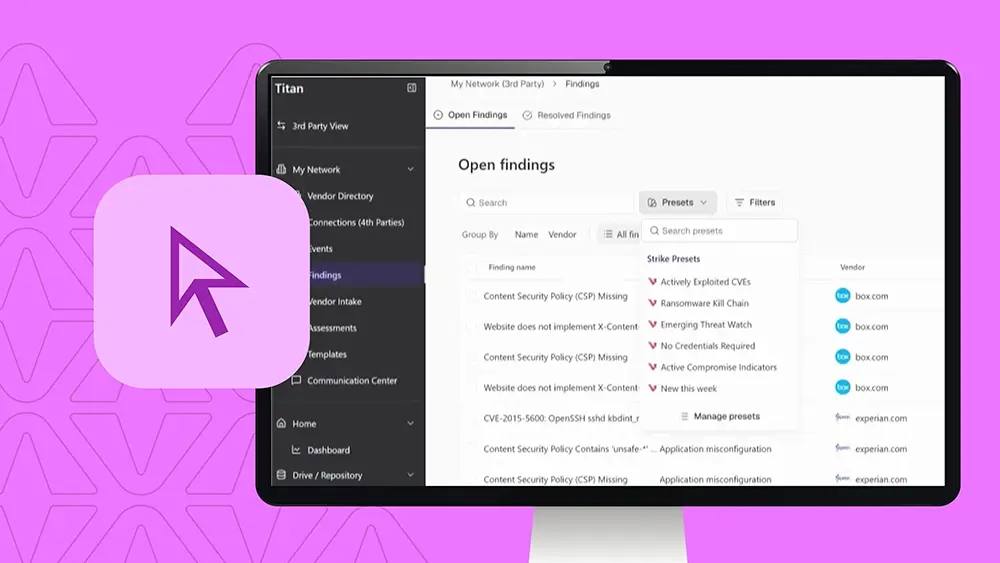
This is a demo of Titan Secure’s drive remediation workflow. It’s the workflow you use once you know availability or exposure exists on a vendor’s assets and you need it fixed. This workflow is built for the TPR analyst running day to day remediation with visibility for the TPR manager tracking resolution rates across the portfolio. If you’re the person deciding which fires to put out first, this is your workflow. And as you can see here on our findings view, across the portfolio, that’s thousands of findings. And most tools prioritize based on historical experience, not what’s happening right now. That means that some of the issues that matter most today aren’t prioritized, and some that got flagged months ago are still at the top of the list. Titus Secure ships with presets built by our Strike Threat research team. Instead of scoring findings by what happened in the past, these presets rank findings by what matters now. This one called emerging threat wash narrows down thousands of findings down to the ones tied active threat campaigns today. Same portfolio, same findings, but now the risk… The list reflects the current risk landscape instead of a correlated score set. Click on any finding, and you’ll get the specifics, The CV, how severe it is, and whether it’s an active exploitation using CISA’s KEV list. That KEV stats is what keeps this forward looking. It’s not just how bad the vulnerability could be. It’s whether attackers are actually using it right now. From there, you can choose an action. Request remediation sends a targeted message to the vendor about this finding, not a bulk list of everything wrong in their environment. You can also send an internal message, accept the risk formally, or flag it to boost internal prioritization without notifying the vendor at all. When you request remediation, the vendor will get a request about this one issue. They know exactly what to fix, which means they can actually triage it. Instead instead of getting a bulk ask, they’ll be prioritized because everything on the list looks equally urgent. The request then lands in our exchange hub alongside everything else you’ve sent to this vendor. Same centralized thread as any other communication. You’re not tracking this in a spreadsheet on the side. And when the vendor tells you it’s fixed, Titan doesn’t… Titan doesn’t just take their word for it. We automatically rescan the asset. And if a vulnerability is actually gone, the finding closes, and you have a verified record. So that’s Stripe remediation in Titan Secure, from thousands of the findings to the ones that matter, to a targeted request to the vendor that the vendor can actually act on to a verified close. One workflow that TBR analysts can run without reading every finding or trusting every vendor claim.
This workflow is built for the TPRM analyst running day-to-day remediation, with visibility for the TPRM manager tracking resolution rates across the portfolio. If you’re the person deciding which fires to put out first, this is your workflow.

The problem: thousands of findings, ranked by the wrong thing

On the findings view, across the portfolio, that’s thousands of findings. Most tools prioritize based on historical experience, not what’s happening right now. That means:

  • Some of the issues that matter most today aren’t prioritized
  • Some that got flagged months ago are still at the top of the list

Presets built for what matters now

TITAN Secure ships with presets built by our STRIKE Threat research team. Instead of scoring findings by what happened in the past, these presets rank findings by what matters now.

One preset, called Emerging Threat Watch, narrows thousands of findings down to the ones tied to active threat campaigns today. Same portfolio, same findings — but now the list reflects the current risk landscape instead of a correlated score set.

Finding details: is it being exploited right now?

Click on any finding and you’ll get the specifics: the CVE, how severe it is, and whether it’s under active exploitation using CISA’s KEV list.

That KEV status is what keeps this forward-looking. It’s not just how bad the vulnerability could be — it’s whether attackers are actually using it right now.

Taking action on a finding

From there, you can choose an action:

  • Request remediation: sends a targeted message to the vendor about this one finding — not a bulk list of everything wrong in their environment
  • Send an internal message
  • Accept the risk formally
  • Flag it to boost internal prioritization without notifying the vendor at all

When you request remediation, the vendor gets a request about this one issue. They know exactly what to fix, so they can actually triage it — instead of getting a bulk ask where everything on the list looks equally urgent, this gets prioritized.

Centralized tracking, not a spreadsheet

The request lands in our Exchange Hub alongside everything else you’ve sent to this vendor — the same centralized thread as any other communication. You’re not tracking this in a spreadsheet on the side.

Verified close, not just the vendor’s word

When the vendor says it’s fixed, TITAN doesn’t just take their word for it — we automatically rescan the asset. If the vulnerability is actually gone, the finding closes and you have a verified record.

The full picture

That’s drive remediation in TITAN Secure: from thousands of findings, to the ones that matter, to a targeted request the vendor can actually act on, to a verified close. One workflow that TPRM analysts can run without reading every finding or trusting every vendor claim.