
TITAN AI Workflow

Run Your Entire TPRM Program, End to End

No more chasing vendors. No more stale snapshots. One continuous workflow that watches, prioritizes, and resolves risk automatically, from first scan to closed issue.

TPRM Still Runs on Manual Handoffs

Vendor intake, questionnaires, monitoring, and remediation live in separate tools and separate manual steps today. Every hand-off depends on someone remembering to do it, and vendor volume is growing faster than any fixed team can process by hand. The result: backlogs that never clear, and risk that sits unaddressed between hand-offs.

Speed Meets Accuracy

Nothing Falls Through a Hand-Off

The system runs the lifecycle continuously, launching assessments, evaluating responses, and flagging only the exceptions that need a person.

Findings Become Resolved Issues

A finding doesn’t just produce a grade. It’s prioritized against active threat activity, routed for remediation, and verified independently before it’s marked closed.

You Choose How Much to Automate

Every agent action can run fully autonomously or wait for your approval first, so you choose how much AI handles and how much stays with your team.

TITAN Assess helps us get questionnaires done sooner to help speed up that sales process to make sure that the AEs, SEs and whoever is involved are able to get those questions back to the prospects and customers as quickly as possible and be able to close those deals.”
Brandon Maxwell
Head of IT Operations and Information Security

Scale Your Program Without Scaling Your Headcount
Workflow-D-24
TITAN-Workflow

As your vendor ecosystem grows, TITAN AI absorbs the added volume, so your team’s size doesn’t have to.

Icon

Bring Every Vendor In, Automatically

A self-service intake form scopes each new vendor into a directory with scores and grades, automatically triggers a risk-tiering questionnaire, and resolves the correct legal entity, all without a back-and-forth between teams.

Organizations can complete the vendor intake process within Titan AI. They would start by building the form directly in the platform. This form will contain all of the questions that they’d like. They have the ability to add more questions, remove questions. Each question will get mapped to a field that will be stored within the vendor’s profile. You can also decide if they want questions to be required or not and if it affects the risk score. These risk rules will determine how critical the vendor ends up being. This is all customizable as well, and you can add different conditions to help influence the risk level. These conditions can be tested to see what the outcome will be if a certain field is entered. Once the form is built, the link can be shared with internal stakeholders, colleagues, other team members, whoever is requesting a new vendor for the organization. The form is accessed through the URL that was shared. From here, a user can add in all the information for the new vendor. They could put in notes and have the AI prefill the form, or they can manually start filling out the fields that the form is asking for. Spender has not been assessed yet. Enter in an internal business owner, some sample numbers, and I can submit this form. Once the form is submitted, the vendor will show up as a new item in the vendor intake list. I would be able to open up the form and see all of the details that was provided about the vendor. And from here, I can select whether I’d like to complete the intake or reject the intake.
Titan assess is taking us out of spreadsheets. We can run evaluations on vendors using their already available documentation and provide prioritized risk reports, draft remediation messages, and close the vendor loop without ever opening a PDF or a spreadsheet. So how do we go from a questionnaire to a single screen of analysis? It starts with our agentic template editor. Import any spreadsheet, then attach evaluation criteria to each question. From there, a mix of deterministic and AgenTik review checks two things, whether a vendor’s attestation matches your policies and whether it holds up against their own audited reports. With our template built, I have two options. I can run an autofill based on the vendor’s available documentation, or I can invite the vendor to complete it themselves.
Icon

Build, Send, and Evaluate Questionnaires Automatically

Import an existing questionnaire or start from SIG or CAIQ Lite, send it with a single passwordless link, and let an agent check every answer against your policy and the vendor’s own evidence.

Icon

See Your Whole Ecosystem, Continuously

Point-in-time assessments leave most of your portfolio invisible between reviews. TITAN AI brings the whole ecosystem into continuous view, including uncatalogued vendors and the fourth parties sitting behind them.

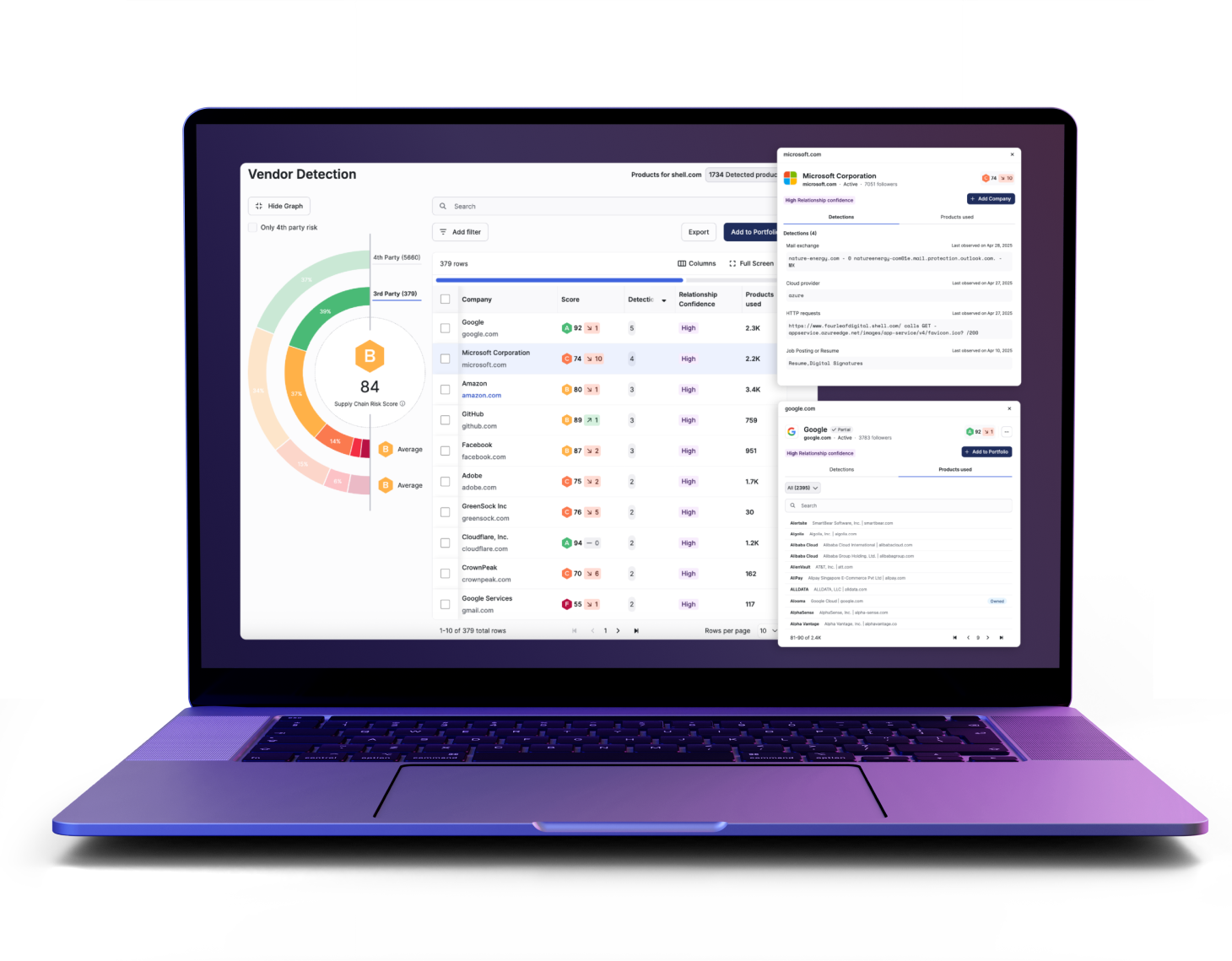
Breach and threat intelligence today is scattered. It’s buried in news coverage, hacker forums, and breach reporting. By the time your team manually connects this information to your supply chain, you’ve already lost response time. Most third party risk platforms only give you a delayed disclosure, not real time context on why it matters to you. That’s exactly what Security Events in TITAN Secure solves. The Security Events feature represents one centralized feed of external breaches, zero days, and emerging threats across your entire supply chain. Instead of you performing the manual correlation, the platform automatically maps fragmented signals directly to your existing data. Other platforms hand you ROF, threat feeds, or generic advisories, while TITAN Secure connects the information directly to your portfolio, so you skip the manual triage entirely. Let’s look at how you would use this day to day. The security events page is a live feed built for fast scanning. New developments surface immediately, so nothing sits unnoticed. Each event card gives you the who, what, and when at a glance. Event tags distinguish confirmed incidents from unverified chatter. For example, a compromise tag with a breach subtype means it’s confirmed, as it is in this example, whereas a threat tag with a hacker chatter subtype means it’s alleged. Status badges tell you exactly where things stand. Are they active or are they still being investigated? And the impact summary displays vendors affected, along with confirmed and potentially affected vendor counts. Now let’s go deeper. Selecting an event opens a full investigation workspace. No more toggling between news sites, forums, and spreadsheets. At the top, the description gives a plain language summary of the vulnerability, attack, or breach, including overall analysis and technical details. On the right, you will see the supply chain impact. The impact summary breaks the event down at a portfolio level. The vendor impact translation displays confirmed versus potential exposure, And a response progress bar tracks who’s responded, who’s pending, and who hasn’t been contacted. While the impact result donut chart splits vendors by impact type. As you scroll down, you will see a timeline, which is a chronological view of when the event was first detected, and when new sources or intelligence were added so you can see exactly how the story develops. Every source that we have used to identify and validate the event is listed right here, fully cited for transparency. And finally, the vendor overview table lists every vendor potentially affected by the event. You will be able to see why the vendor is linked. In this case, this is a fourth party connection. You will be able to see the current investigation status and the outcome of the impact analysis. Competitors typically stop at here’s a breach, while TITAN goes much further in giving you evidence, escalation readiness, and vendor level response tracking, all in a single pane of glass. The security events are not just alerts, but alerts plus context plus action. This feature helps teens move from reactive noise sifting to proactive evidence backed decision making. TITAN Secure gives you faster triage, cleaner and clearer escalation paths, and full transparency into how a single event ripples across your entire vendor ecosystem.
This is a demo of Titan Secure’s drive remediation workflow. It’s the workflow you use once you know availability or exposure exists on a vendor’s assets and you need it fixed. This workflow is built for the TPR analyst running day to day remediation with visibility for the TPR manager tracking resolution rates across the portfolio. If you’re the person deciding which fires to put out first, this is your workflow. And as you can see here on our findings view, across the portfolio, that’s thousands of findings. And most tools prioritize based on historical experience, not what’s happening right now. That means that some of the issues that matter most today aren’t prioritized, and some that got flagged months ago are still at the top of the list. Titus Secure ships with presets built by our Strike Threat research team. Instead of scoring findings by what happened in the past, these presets rank findings by what matters now. This one called emerging threat wash narrows down thousands of findings down to the ones tied active threat campaigns today. Same portfolio, same findings, but now the risk… The list reflects the current risk landscape instead of a correlated score set. Click on any finding, and you’ll get the specifics, The CV, how severe it is, and whether it’s an active exploitation using CISA’s KEV list. That KEV stats is what keeps this forward looking. It’s not just how bad the vulnerability could be. It’s whether attackers are actually using it right now. From there, you can choose an action. Request remediation sends a targeted message to the vendor about this finding, not a bulk list of everything wrong in their environment. You can also send an internal message, accept the risk formally, or flag it to boost internal prioritization without notifying the vendor at all. When you request remediation, the vendor will get a request about this one issue. They know exactly what to fix, which means they can actually triage it. Instead instead of getting a bulk ask, they’ll be prioritized because everything on the list looks equally urgent. The request then lands in our exchange hub alongside everything else you’ve sent to this vendor. Same centralized thread as any other communication. You’re not tracking this in a spreadsheet on the side. And when the vendor tells you it’s fixed, Titan doesn’t… Titan doesn’t just take their word for it. We automatically rescan the asset. And if a vulnerability is actually gone, the finding closes, and you have a verified record. So that’s Stripe remediation in Titan Secure, from thousands of the findings to the ones that matter, to a targeted request to the vendor that the vendor can actually act on to a verified close. One workflow that TBR analysts can run without reading every finding or trusting every vendor claim.
Icon

Get Vendors to Actually Fix It

Draft and send remediation requests, follow up automatically, and verify the fix with an independent rescan, so you’re never taking the vendor’s word for it.

Icon

Automate Any Rule, Chain Any Action

Build a visual workflow that chains multiple conditions and actions together, deterministic and repeatable, with full visibility into every run, not a single if/then rule triggering one action.

In this video, I’m gonna be going over workflows. It is one of the new automations available on the Titan AI platform. It is something that is tremendously awesome. So, ultimately, when a user logs into Titan, they have the ability to navigate to workflows. And as you can see, they can have a multitude of workflows in different categories of a draft format published, what’s actively running, paused, completed, failed, canceled. And, ultimately, the workflow builder will have a multitude of templates that customers can lean on to say, hey. I I would like to build a workflow around vendor intake or a quarterly vendor review or findings review or continuous monitoring. But, ultimately, what a workflow is is being able to mix and match different outcomes with different triggers from within the Titan platform. Ultimately, empowering customers to say, hey. Why does an alert have to now require two to three manual tasks where I move the the the ball down the field, so to speak, to the next stage where then I wait for the next set of an alert? Right? An example would be a vendor intake form coming in, getting an alert that it’s been completed. Well, now I would have to go into the platform, review the intake form, see what the inherent risk came through as, whether it’s low, medium, high, or critical, making that determination of what’s the next step, triggering out the proper assessment to that vendor. And now I can pause and wait for the next alert to come in where I would receive the alert that that assessment’s been completed. With workflows, you can automate and map all of that out with ease within the within within the Titan platform. So what ultimately it can look like is the trigger can be a vendor intake has came into the platform. The system will analyze the responses. If it’s low inherent risk based on the risk scoring, maybe you get an alert, and the vendor’s been added to a portfolio for monitoring. No assessment been sent. Same for medium. But maybe if it’s a high or critical supplier based on inherent risk, we tell the platform to natively pull vendor details, grab the template that we need to send that’s associated with that vendor intake. Right? Maybe it is the the SIG, like, gets sent to critical suppliers. And now we send the questionnaire. And now I get an alert when the questionnaire comes back completed, and then I just need to pop in and look at the Titan analysis of the assessment. Or maybe I get the notification that the questionnaire is overdue, but we also wanna trigger that reminder to the supplier as well. And then I get the final alert once everything’s completed, ultimately empowering me as the vendor risk manager to automate a lot of these workflows and tasks where I’m really getting alerted about completed risks or completed evaluations where now my expertise, my review is needed. But I do not need to manually trigger these assessments to go out. I can automate the workflow, give it the guidelines and strategy around what I would like to see in terms of next steps. And, of course, you can have a multitude of these workflows. They can they can meld and work with alerting as well, And an agent for normal language will be available to support the building of these web charts, so to speak, using normal language. So customers do not necessarily need to build something from scratch or lean on a template. However, it is very easy to edit. Right? If I wanted to bring in generate a micro summary and pull this out, I can actually connect the two. I can drag this into the below view. I can add different steps or tasks accordingly.

Frequently Asked Questions (FAQs)

Looking for an answer? We’ve gathered frequently asked questions to quickly address your common queries

Find more answers in our help center

How is this different from my existing process?

TITAN AI removes the manual work itself, agents assess, prioritize, and drive remediation, so your team steps in only for judgment calls.

Can I bring my own questionnaire or do I have to start from scratch?

Import an existing questionnaire from Excel, CSV, or JSON, or start from a pre-built framework like SIG or CAIQ Lite. Either way, it’s ready to send in minutes.

How do you verify a vendor actually fixed something, instead of just taking their word for it?

When a vendor claims a fix, the platform automatically rescans. If the finding is still present, it reopens, no manual follow-up required.

We’re not comfortable with AI directly contacting our vendors. What do we do?

Every outbound message is templated and policy-bound, built from the specific finding and vendor, not open-ended text generated on the fly. You can require human approval before anything is sent.

Will this add more alerts to a team that’s already stretched thin?

The default view isn’t every finding, it’s the findings tied to active threat activity. You decide what breaks through, not the raw volume of what’s out there.
See the Full Workflow Running on Your Data

  • Bring a new vendor into the program without a single manual step
  • Resolve more critical issues by prioritizing what adversaries are actively exploiting
  • Produce a defensible, board-ready risk report without assembling exports by hand