Custom Scorecards in the SecurityScorecard Platform
Custom scorecards provide a unique and effective way to segment and zero in on the specific domains, IPs, or geolocations where risk matters most to you all from within a scorecard. They can be built around any vendor scorecard or around your own scorecard within the platform.
How to Get Started
To navigate to custom scorecards, go to the top navigation bar, find My Organization, and select Custom Scorecards.
If you already have custom scorecards, they’ll appear in the list. If not, the page will load empty. To generate a new one, select New Custom Scorecard.
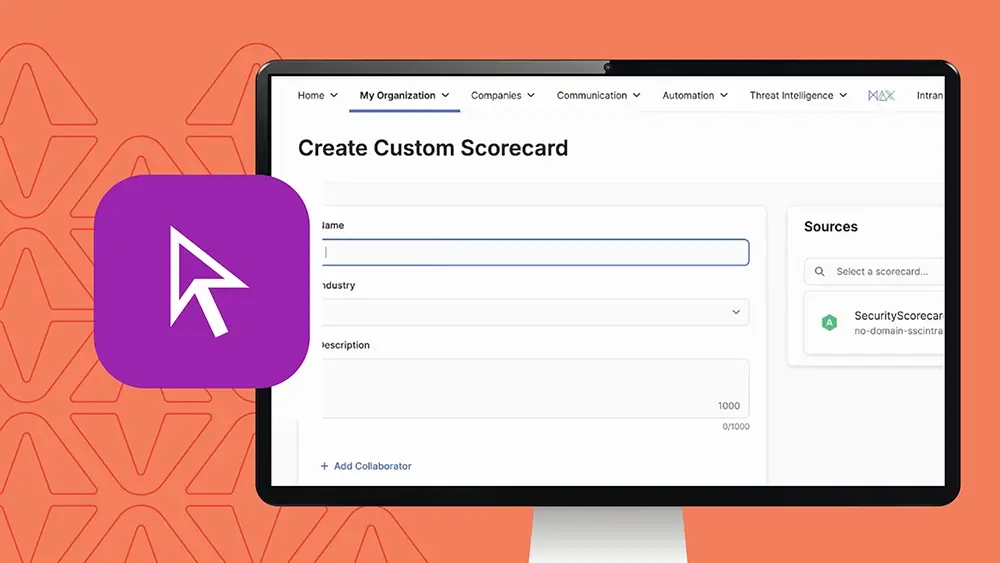
Setting Up a Custom Scorecard
From there, you can:
- Title the scorecard whatever you like
- Apply the applicable industry
- Add a description for context
- Add internal collaborators from your team who can edit and adjust it
Privacy and visibility: You can set the scorecard’s visibility internally or externally. If you select “can view” for anyone else, it becomes a searchable scorecard for all SecurityScorecard users. This is especially useful if you want to create a product-specific set of domains and IPs for your customer base to review and evaluate.
Source scorecards: Whatever scorecard you select under Sources becomes the source scorecard it will leverage all domains and IPs within that digital footprint, as well as all issue types within the scorecard. You can also merge two or three scorecards to increase the scope of assets you can filter by.
Filtering Your Assets
Scrolling down, you’ll find the filter selection, which lets you tell the platform exactly what to include or exclude:
- IPs, IP ranges, or CIDR blocks
- Domains and subdomains
- Geolocation
- Tagged assets
If you select domains or IPs, you can also include associated domains or associated IPs to make filtering more effective and seamless. You can include or exclude at the asset level, as well as include or exclude specific risk factors or issue types.
Once your custom scorecard and assets are configured, you can preview the assets to see exactly what information will be pulled in.
Why Use Custom Scorecards
Custom scorecards let you:
- Create niche reporting scorecards for internal communication
- Zero in on a specific subset of assets tied to a critical supplier
- Monitor assets you directly engage with, alongside the public scorecard, for a true 360-degree view of risk in a highly configurable way
Once It’s Live
Once created, your custom scorecard lives on the Custom Scorecards page. Click into any scorecard to land on a scorecard overview page that looks, feels, and operates like any other scorecard in the platform you can report on it at a summary or detailed issue level, and keep it in a portfolio for continuous monitoring.
Custom scorecards are also part of SecurityScorecard’s daily scanning cadence, so there’s no manual requirement to refresh or update scans against the assets in the digital footprint.