Video

TITAN AI – Automate Vendor Risk Workflows

TITAN AI – Automate Vendor Risk Workflows
Workflows are one of the new automations available on the TITAN AI platform — and they change how much manual work vendor risk management actually requires.

In this video, I’m gonna be going over workflows. It is one of the new automations available on the Titan AI platform. It is something that is tremendously awesome. So, ultimately, when a user logs into Titan, they have the ability to navigate to workflows. And as you can see, they can have a multitude of workflows in different categories of a draft format published, what’s actively running, paused, completed, failed, canceled. And, ultimately, the workflow builder will have a multitude of templates that customers can lean on to say, hey. I I would like to build a workflow around vendor intake or a quarterly vendor review or findings review or continuous monitoring. But, ultimately, what a workflow is is being able to mix and match different outcomes with different triggers from within the Titan platform. Ultimately, empowering customers to say, hey. Why does an alert have to now require two to three manual tasks where I move the the the ball down the field, so to speak, to the next stage where then I wait for the next set of an alert? Right? An example would be a vendor intake form coming in, getting an alert that it’s been completed. Well, now I would have to go into the platform, review the intake form, see what the inherent risk came through as, whether it’s low, medium, high, or critical, making that determination of what’s the next step, triggering out the proper assessment to that vendor. And now I can pause and wait for the next alert to come in where I would receive the alert that that assessment’s been completed. With workflows, you can automate and map all of that out with ease within the within within the Titan platform. So what ultimately it can look like is the trigger can be a vendor intake has came into the platform. The system will analyze the responses. If it’s low inherent risk based on the risk scoring, maybe you get an alert, and the vendor’s been added to a portfolio for monitoring. No assessment been sent. Same for medium. But maybe if it’s a high or critical supplier based on inherent risk, we tell the platform to natively pull vendor details, grab the template that we need to send that’s associated with that vendor intake. Right? Maybe it is the the SIG, like, gets sent to critical suppliers. And now we send the questionnaire. And now I get an alert when the questionnaire comes back completed, and then I just need to pop in and look at the Titan analysis of the assessment. Or maybe I get the notification that the questionnaire is overdue, but we also wanna trigger that reminder to the supplier as well. And then I get the final alert once everything’s completed, ultimately empowering me as the vendor risk manager to automate a lot of these workflows and tasks where I’m really getting alerted about completed risks or completed evaluations where now my expertise, my review is needed. But I do not need to manually trigger these assessments to go out. I can automate the workflow, give it the guidelines and strategy around what I would like to see in terms of next steps. And, of course, you can have a multitude of these workflows. They can they can meld and work with alerting as well, And an agent for normal language will be available to support the building of these web charts, so to speak, using normal language. So customers do not necessarily need to build something from scratch or lean on a template. However, it is very easy to edit. Right? If I wanted to bring in generate a micro summary and pull this out, I can actually connect the two. I can drag this into the below view. I can add different steps or tasks accordingly.
Navigating Workflows in TITAN

When a user logs into TITAN, they can navigate directly to Workflows. From there, they can manage a multitude of workflows across different stages:

  • Draft
  • Published
  • Actively running
  • Paused
  • Completed
  • Failed
  • Canceled

The workflow builder also includes a multitude of templates customers can build from, such as:

  • Vendor intake
  • Quarterly vendor review
  • Findings review
  • Continuous monitoring

At its core, a workflow is the ability to mix and match different outcomes with different triggers from within the TITAN platform.

Why Workflows Matter

Today, a single alert often requires two or three manual tasks before the next stage can even begin — moving the ball down the field, so to speak, while waiting on the next alert to arrive.

For example: a vendor intake form comes in, and you get an alert that it’s been completed. From there, you’d have to go into the platform, review the intake form, see what the inherent risk came through as (low, medium, high, or critical), decide the next step, and trigger the proper assessment for that vendor. Then you pause and wait for the next alert — that the assessment has been completed.

With workflows, you can automate and map all of that out with ease, directly within the TITAN platform.

How a Workflow Runs: Vendor Intake Example

Here’s what that can look like in practice:

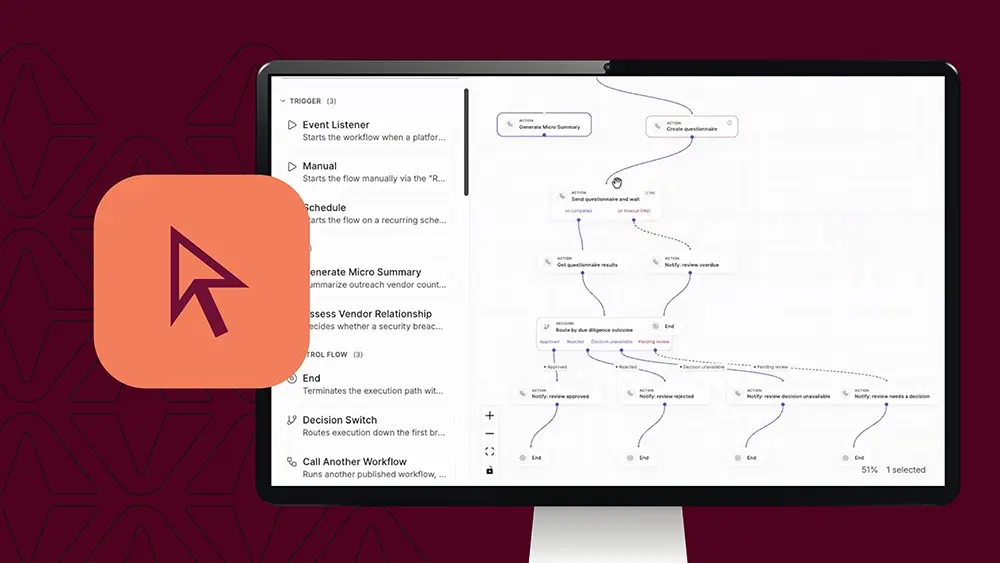
  • Trigger: A vendor intake form comes into the platform.
  • Analysis: The system analyzes the responses and scores inherent risk.
  • Low or medium risk: You get an alert, and the vendor is added to a portfolio for monitoring — no assessment is sent.
  • High or critical risk: The platform natively pulls vendor details, grabs the template associated with that vendor intake (for example, a SIG questionnaire for critical suppliers), and sends it out.
  • Questionnaire completed: You get an alert, and you simply review the TITAN analysis of the assessment.
  • Questionnaire overdue: You get a notification, and the platform triggers a reminder to the supplier automatically.
  • Final completion: You get one last alert once everything is done.

The result: as a vendor risk manager, you’re alerted about completed risks and completed evaluations — the moments where your expertise and review are actually needed. You’re no longer manually triggering assessments to go out. Instead, you automate the workflow and give it the guidelines and strategy for what you want to see at each step.

You can build a multitude of these workflows, and they can work together with alerting as well.

Building Workflows with Natural Language

A natural language agent will be available to support building these workflows using plain language. Customers don’t need to build something from scratch or rely on a template — though templates remain easy to edit.

For example, if you wanted to generate a micro summary and pull that into a workflow, you can connect the two: drag it into the view below and add different steps or tasks accordingly.